Help, just got Chrome book

Pudsey Bear

Full Member

Messages
15,625
Phew, for the money it looks like brand spanking new, not single mark on it anywhere but I've only just figured out how to turn the sound off, the bloody thing wouldn't shut up.

Not the fastest thing to be honest, but I didn't buy it for that https://www.ebay.co.uk/itm/363915513297

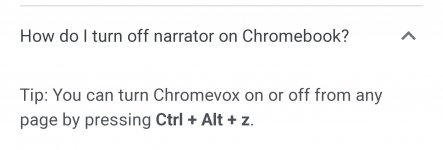
So is there a way to stop it telling me everything I'm doing as it's stupidly annoying.

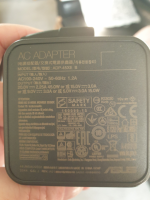
Also looking at the picture below will it run from a std USB C lead as that is what the plug is coming from the brick?
1666107432764.png
 
Phew, for the money it looks like brand spanking new, not single mark on it anywhere but I've only just figured out how to turn the sound off, the bloody thing wouldn't shut up.

Not the fastest thing to be honest, but I didn't buy it for that https://www.ebay.co.uk/itm/363915513297

So is there a way to stop it telling me everything I'm doing as it's stupidly annoying.

Also looking at the picture below will it run from a std USB C lead as that is what the plug is coming from the brick?

View attachment 64751
Ref the USB question .... What I am about to say I *think* is correct but I don't know for sure as I have no devices of this kind - maybe use this comment as a search starting point?
The connector type is indeed USB C, however it is probably a PD ('Power Delivery'?) connection.
So if you connect to USB via the USB C cable, I think you will be limited to the 3A@5A (15W) as that is the USB standard; but if you fit a PD socket in the place of the USB Socket (I am assuming you are using this in your van and plugging into a USB socket in it currently?), then you will get the higher charge rate.
Maybe try something like this to see - https://amzn.to/3VMXT3A - Not a bad price at £8 and just needs pushing in an existing 12V socket. You would need to use a PD lead for this for the higher voltage I beleive - so a USB C connector both ends so you can plug into the PD socket.
 
Thanks David, after a few times reading that I ordered a socket and a USB C to USB C cable.

I see the smaller PD USB C socket at the top, but what is the orange one below it?
 
Thanks David, after a few times reading that I ordered a socket and a USB C to USB C cable.

I see the smaller PD USB C socket at the top, but what is the orange one below it?
That's a QC3 USB - standard USB (5V) but can charge faster for those devices that support it. (Note: this is as I understand it. I don't have any fancy PD kit, although I did buy a dual output (PD + QC3) socket with voltmeter to fit in the dash instead of the standard 12V socket and it seems to work well with the phone :)
 
Regarding the Chromebook, It is way too slow to be regarded as a tool or even an everyday laptop, but I bought it to replace my Samsung Galaxy Tab A for downloading and watching YouTube and Netflix stuff to watch in the van and although it is a bit on the slow side downloading it's done over Wi-Fi at home when I'm doing other things so not an issue, might be if I do it in a MacDonalds it also has twice as much storage. The Tab A is still working but seems to be suffering from battery issues IE it doesn't last long before needing a charge, the Chromebook also has a bigger screen and a proper keyboard and I can use a mouse so overall a much better tool for what I needed.
 
That's a QC3 USB - standard USB (5V) but can charge faster for those devices that support it. (Note: this is as I understand it. I don't have any fancy PD kit, although I did buy a dual output (PD + QC3) socket with voltmeter to fit in the dash instead of the standard 12V socket and it seems to work well with the phone :)
I had no idea such things existed so I may buy another for charging the phone when its used as a sat nag.

I just wish they would make these things without out illumination Liz hates anything with lights on at sleepy time.
 
I had no idea such things existed so I may buy another for charging the phone when its used as a sat nag.

I just wish they would make these things without out illumination Liz hates anything with lights on at sleepy time.
The number of times I have been asked for USB sockets without lights ......

The push-in USBs tend to be the only ones around. I used to do lots of different colours and the Amber and Green ones I thought were the best for nighttime if one with a light was the only option. The Blue and Red ones are always much too bright :(
 
Regarding the Chromebook, It is way too slow to be regarded as a tool or even an everyday laptop, but I bought it to replace my Samsung Galaxy Tab A for downloading and watching YouTube and Netflix stuff to watch in the van and although it is a bit on the slow side downloading it's done over Wi-Fi at home when I'm doing other things so not an issue, might be if I do it in a MacDonalds it also has twice as much storage. The Tab A is still working but seems to be suffering from battery issues IE it doesn't last long before needing a charge, the Chromebook also has a bigger screen and a proper keyboard and I can use a mouse so overall a much better tool for what I needed.
You can get Keyboards for Tablets :)
I don't actually use this on - https://amzn.to/3eOyqX7 (cost £23) - very much, but bought it when I burnt my hand and wasn't sure how long it would take to heal (4 years ago and just about ok now!)
 
The number of times I have been asked for USB sockets without lights ......

The push-in USBs tend to be the only ones around. I used to do lots of different colours and the Amber and Green ones I thought were the best for nighttime if one with a light was the only option. The Blue and Red ones are always much too bright :(
Glad it's not just me then :D :D

Not sure of the best way to blank them out, any ideas, I have tried a sharpie which partially works.
 
Chrome is just a new fancy google, spy ware, dont put any banking or emails of girlfriends on it. 😂
 
Thanks David, after a few times reading that I ordered a socket and a USB C to USB C cable.

I see the smaller PD USB C socket at the top, but what is the orange one below it?
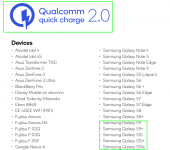
This is a good read (if your into that ) explaining the the different QC methods basically the voltage is increased rather than the amps to charge quickly.

 
This is a good read (if your into that ) explaining the the different QC methods basically the voltage is increased rather than the amps to charge quickly.

I didn't read it all but I did look for my devices and the Chromebook isn't in there nor are any Chormebooks neither is my Samsung Tab A but my phone is and the one I'm looking to buy next.

1666508661129.png
 

Users who viewed this discussion (Total:0)

Back
Top